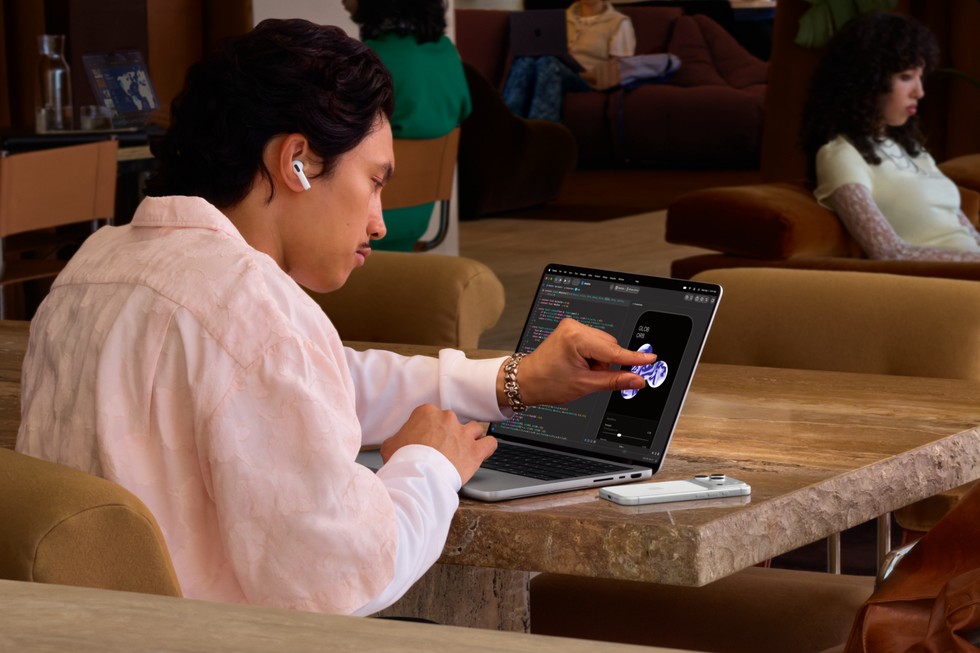
The new touchscreen MacBook Pro is a meaningful display upgrade. That does not make it an automatic replacement for a perfectly good Mac. The right question is whether the screen and lighter design solve a problem you actually have — and whether those gains are worth the complete configuration price.
Checked November 6, 2026. This is an AI-assisted, source-checked buying analysis, not a ClearTech hands-on review. Manufacturer claims and other publications’ testing are identified separately.
First, which “ordinary” MacBook Pro?
There are two useful comparisons: the entry 14-inch M6 model with Liquid Retina XDR, and an earlier M5 Pro/Max MacBook Pro without PROLED. Those are different buying decisions. A higher generation number is not a substitute for comparing chip tier, memory, storage and your applications.
Apple’s PROLED models use M5 Pro or M5 Max, while the entry M6 machine remains a separate product. PROLED adds tandem OLED, touch and Dynamic Island, with a thinner, lighter design. Apple specifies up to 2,000 nits peak brightness and a variable refresh rate up to 120Hz. Those are manufacturer figures, not our measurements. Apple’s announcement explains the differences.
What it costs in the US and Canada
These are standard starting prices, before sales tax, upgrades and optional coverage — not financing payments or education prices.
- 14-inch Liquid Retina XDR, M6 — United States (USD): $1,999; Canada (CAD): $2,799.
- 14-inch PROLED XDR, M5 Pro — United States (USD): $2,899; Canada (CAD): $3,999.
- 16-inch PROLED XDR, M5 Pro — United States (USD): $3,399; Canada (CAD): $4,799.
- 14-inch PROLED XDR, M5 Max — United States (USD): $4,499; Canada (CAD): $6,299.
- 16-inch PROLED XDR, M5 Max — United States (USD): $4,799; Canada (CAD): $6,599.
Sources: Apple’s US PROLED, Canadian PROLED, US M6 and Canadian M6 announcements.
The entry-point gap is US$900 or C$1,200. That is not the price of adding OLED to an otherwise identical computer: the chips and configurations differ. Compare two saved shopping carts with the memory and storage you need before deciding the premium is justified.
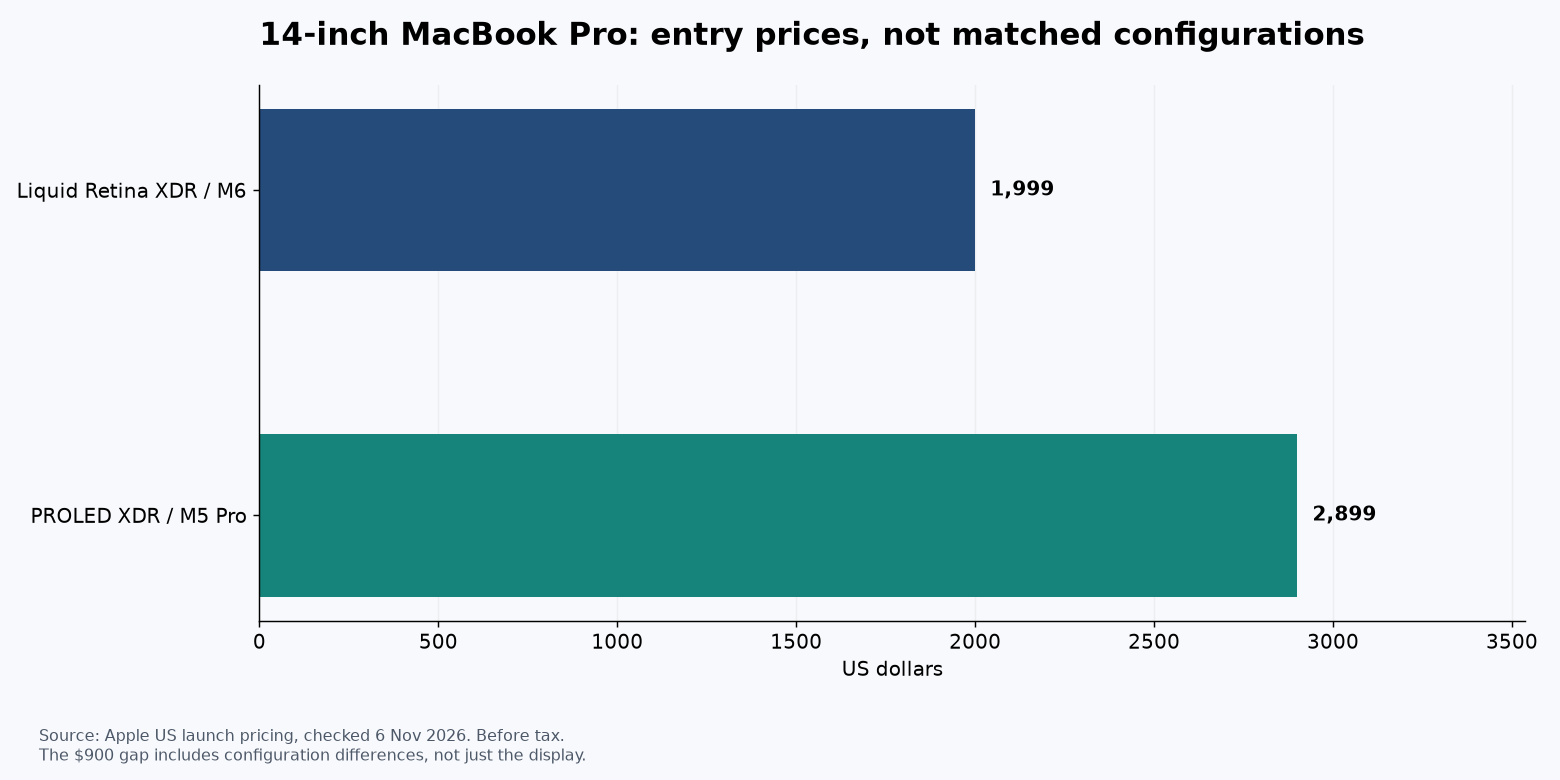 ClearTech chart from Apple launch prices. Different configurations; prices before tax, checked November 6, 2026.
What you gain — and what you do not
For photographers and video editors who work away from a desk, the display is the strongest reason to investigate PROLED. For someone using an external monitor most of the day, that benefit is harder to justify. Touch may help a specific app or gesture; it does not make a laptop a tablet or prove that reaching toward the screen is comfortable for a full workday.
Independent testing also argues against upgrading purely for speed. Tom’s Guide’s review found performance broadly comparable to the earlier M5 Pro/Max machines while praising the display and portability. TechRadar’s review likewise highlights the design, but notes that macOS still centres on traditional laptop inputs. These are their observations, not testing performed by ClearTech.
Our buying verdict
Consider PROLED if you regularly judge photographs or video on the built-in screen, carry your machine daily and can afford the configuration without cutting the memory or storage your work needs. Try your actual apps in a store; a colourful demonstration video is not your workflow.
Choose the ordinary version or keep your current Mac if your work is mostly writing, spreadsheets, browser tools or editing on an external display. An attractive screen cannot recover the cost of replacing hardware that already meets your needs. For owners of an M5 Pro/Max model, the case rests mainly on display, interaction and portability, not a dramatic performance leap.
Wait for more evidence if long-term display behaviour, repair costs or a particular touch workflow decides the purchase. We cannot establish years of reliability from launch-week coverage. Ask about the return policy before ordering, and compare the final tax-inclusive price rather than the monthly payment.
Watch Apple’s official demonstration
This is Apple’s promotional film, not independent testing.
For a lower-cost comparison, see our MacBook Air versus Surface Laptop guide.
Image: Apple Newsroom press photography, used for editorial coverage. No hands-on testing or personal ownership is implied. Prices and availability can change.
Sources & further reading
- https://www.apple.com/newsroom/2026/10/apple-unveils-groundbreaking-macbook-pro-with-proled-xdr-display/
- https://images.apple.com/ca/newsroom/2026/10/apple-unveils-groundbreaking-macbook-pro-with-proled-xdr-display/
- https://www.apple.com/newsroom/2026/10/apple-introduces-the-new-14-inch-macbook-pro-with-m6/
- https://www.apple.com/ca/newsroom/2026/10/apple-introduces-the-new-14-inch-macbook-pro-with-m6/
- https://www.tomsguide.com/computing/macbooks/macbook-pro-with-proled-xdr-display-review
- https://www.techradar.com/computing/macbooks/apple-macbook-pro-with-proled-xdr-display-16-inch-2026-m5-max
- https://www.youtube.com/watch?v=hnZI5uUSdEo
Conversation
Join the conversation
No password needed. Confirm your email once to publish your first comment. Comments appear automatically after verification.
No comments here yet. Start the conversation.