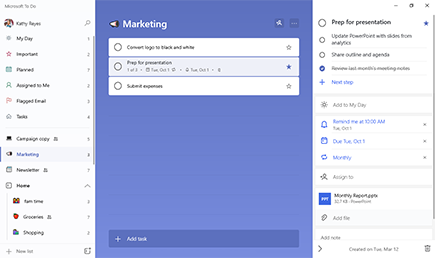
Choose for the way you work.
A starting point based on the official documentation linked below, not a hands-on ranking.
| Your priority | Microsoft To Do | Apple Reminders |
|---|---|---|
| Device mix | Consider it for a mix of Windows and mobile devices | Consider it if your everyday devices are Apple |
| Browser access | Check the web app for your workflow | iCloud.com provides web access |
| Before choosing | Test sharing with the people you work with | Test sharing and feature availability on your devices |
Start with the people using the list
For a shared shopping list or small personal project, the best app is the one everyone can comfortably open. This is a documentation-based comparison checked November 4, 2026, rather than a hands-on notification test.
Microsoft To Do
Microsoft highlights My Day, reminders, due dates and shared online lists. It offers desktop, mobile and web access. If you move between devices, check the download options for your exact operating system and try the web app before migrating your tasks.
Our assessment: To Do is a useful starting point when a browser-accessible task list and a focused daily planning screen matter more than staying within one device ecosystem.
Apple Reminders
Apple documents iCloud Reminders on iPhone, iPad, Mac and iCloud.com. That web access is worth remembering: it is misleading to say the service is accessible only through an Apple device. For shared lists, check participants’ Apple accounts and iCloud setup.
Our assessment: Reminders is a sensible first trial for people already using iCloud across their Apple devices. That does not establish that its notifications or collaboration are better for every person.
Try before moving everything
Create a shared list, set one timed reminder, complete a task on another device and verify it synchronises. Then decide whether your routine benefits from switching. Which task app has stayed useful for you?
Conversation
Join the conversation
No password needed. Confirm your email once to publish your first comment. Comments appear automatically after verification.
No comments here yet. Start the conversation.